The Payables Agent: Automating Vendor Invoices in Business Central

Red office binders on a shelf

In many companies, accounts payable still means opening PDF invoices from an inbox, typing them into the ERP, finding the right purchase order and chasing approvals. It is repetitive, slow and error-prone, and it keeps skilled finance people from more valuable work. The Payables Agent in Dynamics 365 Business Central automates most of this work, while keeping your finance team in control.

Key takeaways for leaders

  • The Payables Agent monitors a mailbox, reads vendor invoices and creates purchase invoice drafts in Business Central.
  • It identifies the vendor and matches invoices to purchase orders, and people review the drafts before posting.
  • It has been generally available since November 2025, and version 28 makes it easier to supervise.
  • The business case is simple: lower cost per invoice, fewer errors and faster processing, which helps with early-payment discounts.
  • It is billed by consumption (Copilot Credits), so the cost scales with your invoice volume.

How the Payables Agent Works

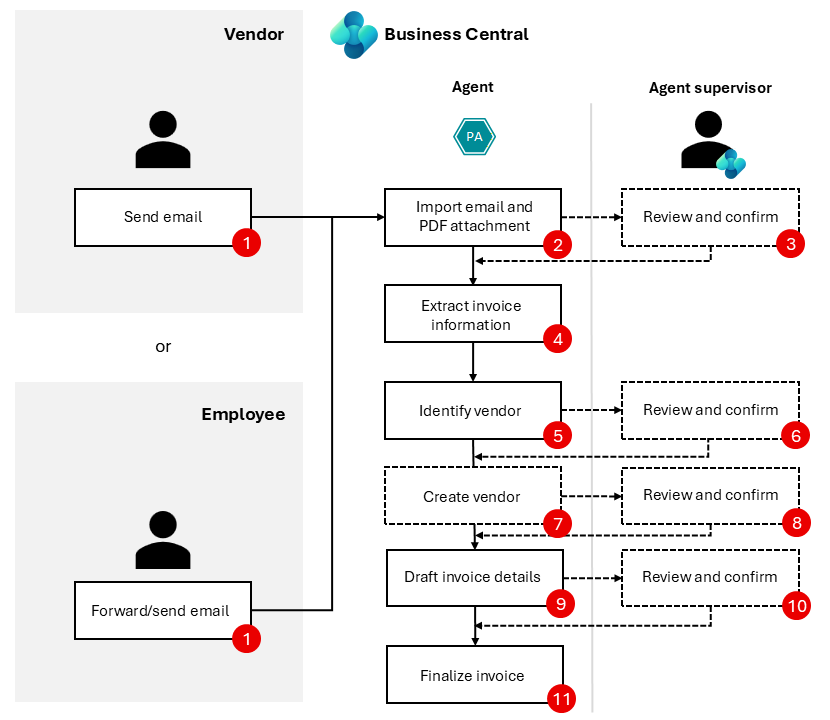
  1. Intake: the agent monitors a dedicated mailbox, such as invoices@yourcompany.com, and picks up incoming invoice attachments.
  2. Reading: invoice data, such as vendor, invoice number, dates, amounts, VAT and lines, is extracted and stored as an e-document.
  3. Matching: the agent identifies the vendor in Business Central and, where relevant, matches the invoice to purchase order lines.
  4. Draft: a purchase invoice draft is created, with any open questions highlighted.
  5. Review: an accounts payable clerk reviews the draft, corrects it if needed and finalises it. Your normal approval workflows and posting controls apply.
Diagram of the Payables Agent flow from incoming email to purchase invoice draft
The Payables Agent flow: from an incoming email to a purchase invoice draft ready for review. Source: Microsoft Learn, licensed under CC BY 4.0.

What's New in Version 28

With 2026 release wave 1, the Payables Agent is easier to manage:

  • You can see which emails in the mailbox have already been processed by the agent.
  • Its tasks appear in the new task pane that collects the work of all agents in one place.
  • Purchase invoices can be matched to multiple order and receipt lines, and inbound e-documents can be linked to existing purchase invoices.

The Business Case

Studies of accounts payable consistently show that manual invoice processing is expensive once you count the time spent on data entry, checking, correcting and filing. Automation reduces:

  • Processing time per invoice, from minutes to seconds of review.
  • Errors, such as typos in amounts, wrong vendors and duplicate payments.
  • Cycle time, so you can take early-payment discounts and avoid late fees.
  • Dependency on individuals, because the process keeps running during holidays and sick leave.

To build your own business case, count your monthly invoice volume, estimate the minutes spent per invoice today, and compare that with the agent’s consumption cost and the remaining review time.

Making It Work: Practical Tips

  • Clean your vendor master data: VAT numbers, bank accounts and names help the agent recognise vendors.
  • Use purchase orders where possible, because matching to orders makes reviews much faster.
  • Ask vendors to send invoices to one mailbox, one invoice per email if possible.
  • Combine with e-invoicing: structured e-invoices, such as Peppol, give the agent perfect data, and they become mandatory for UK VAT invoices from 2029. Read our guide to UK e-invoicing.
  • Name a supervisor who reviews the agent’s tasks every day.

Frequently Asked Questions

What does the Business Central Payables Agent do?

It monitors a mailbox for vendor invoices, extracts the invoice data, identifies the vendor, matches purchase orders and creates purchase invoice drafts in Business Central for a person to review and finalise.

Does the Payables Agent post invoices automatically?

No. The agent prepares drafts, and people review and finalise them. Your existing approval workflows and posting controls still apply.

How is the Payables Agent billed?

Like other Business Central agents, it is billed by consumption through Copilot Credits, so the cost depends on how many invoices it processes.

The Payables Agent turns accounts payable from a typing job into a review job, freeing your finance team to focus on cash, controls and analysis.

Would you like to pilot the Payables Agent with your own vendor invoices? Contact us or book a call with one of our experts.

Related reading

Sign up for monthly Business Central insights that help you get more value from your ERP.

Subscription Form
Scroll to Top

Let's fix this. Fast.

Leave your details and one of our Business Central experts will call you back usually within the same business day.

No sales pitch, just a straightforward conversation about your situation.