Meet the Expense Agent: AI-Powered Expense Management in Business Central

Business travellers walking through an airport walkway

Expense management is one of those processes that nobody enjoys. Employees collect paper receipts, type the amounts into spreadsheets, finance teams chase missing documents and check policies by hand, and reimbursements take longer than they should. With the new Expense Agent, Microsoft brings AI-driven expense management directly into Dynamics 365 Business Central, from capturing the receipt to approval and posting. In this article we explain what the Expense Agent does, how it works, what is new in version 29 and what to consider before you switch it on.

Key takeaways for leaders

  • The Expense Agent automates the whole expense process, from receipt to posted entry, and it is built into Business Central.
  • Employees submit receipts from a web app, Outlook or Copilot Chat. They don’t need a full Business Central licence, because their usage is billed in Copilot Credits.
  • It is available in the UK, and version 29 adds VAT handling and date-based mileage rates, which suit HMRC’s new 55p rate from April 2026.
  • Approvals checked against policies written in plain language give approvers context, and people still make the final decision.
  • It is still in public preview, so start with a pilot group.

What Is the Expense Agent?

The Expense Agent is a built-in AI agent in Business Central that automates the full expense process. It works with Outlook, Microsoft Teams, Microsoft 365 Copilot Chat and a dedicated Expense Agent web app, while Business Central handles posting and ledger entries.

The Expense Agent is not an add-on from a third party. It is part of Business Central, and you activate it through configuration rather than a separate implementation project. It is designed for people who rarely or never log in to Business Central, such as field technicians, drivers, travelling sales staff and office employees who submit a few expenses each month. They submit receipts in the tools they already use, and the agent handles the rest.

How It Works: From Receipt to Posted Expense

  1. Capture. The employee takes a photo of a receipt, uploads it in the web app, or forwards it by email, for example a hotel invoice or a taxi receipt received in Outlook.
  2. Extract. The agent reads the receipt and fills in the key fields: category, amount, currency, merchant, payment method, date, receipt number and a description based on context.
  3. Itemise and enrich. Where needed, the agent itemises the expense (for example, splitting a hotel bill into room, meals and parking), identifies per diem claims from itinerary documents, finds participants for business meals and calculates mileage.
  4. Check. Expenses are checked against company policy. The agent flags anomalies and possible duplicates, and the employee can explain an exception or correct the entry.
  5. Report. Expenses from a defined period are grouped into an Expense Report. If approvals are enabled and no rules are violated, the report can be submitted for approval automatically.
  6. Approve and post. Approvers review a validated report instead of raw attachments. Once it is approved, Business Central posts the expenses using your existing permissions, workflows and audit trail.

Expenses can also be linked to projects or marked as billable, so costs can be charged on to customers.

What's New in Version 29

With Business Central 2026 release wave 2, the Expense Agent (still in public preview) gets a significant set of new capabilities:

  • Available everywhere: the agent can now be used in all countries and regions where Business Central is available, with new languages including Czech, Dutch, Finnish, Icelandic, Italian, Norwegian and Swedish.
  • VAT calculation and reporting: the agent identifies VAT-relevant expenses, calculates VAT amounts and includes them in VAT reporting. Accountants review and confirm the VAT calculation before posting.
  • AI-driven approvals: expense policies can be written in plain language, for example “business class is allowed only for flights longer than six hours”. The agent evaluates each submitted report against these policies and gives approvers context. The final decision always stays with a person.
  • Smarter mileage: mileage rates can be configured by effective date range and vehicle type (for example car, motorcycle or electric vehicle), and the correct rate is applied automatically.
  • Withholding tax: withholding tax on employee expenses can be calculated automatically, with single or multiple taxes per category.
  • Better duplicate prevention: employees are warned when an expense looks like one already in the report or already posted.
  • Assigned projects only: the web app only shows the projects and tasks to which the employee is assigned as a resource.
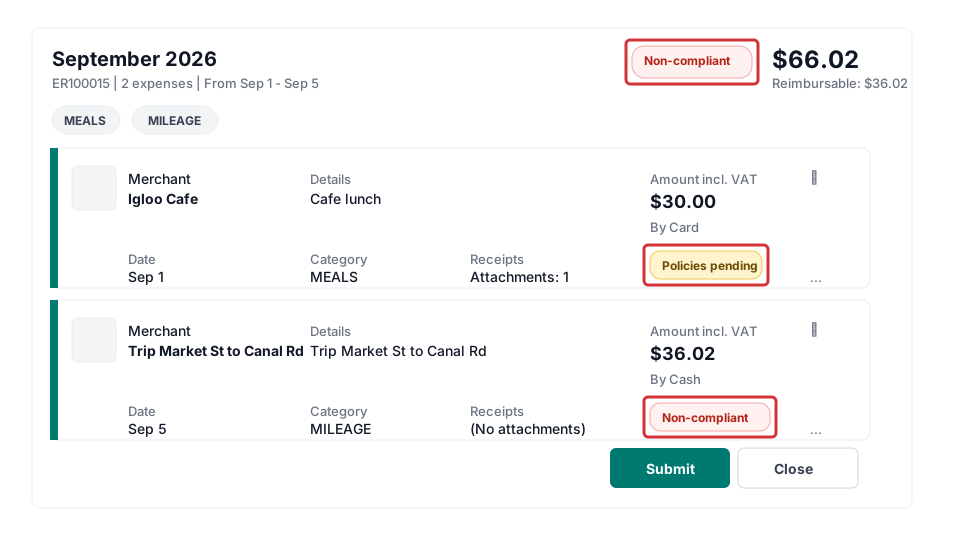
Expense report with line-level policy badges and compliance status
Expense reports show policy compliance at line level, so approvers see issues at a glance. Source: Microsoft Learn, licensed under CC BY 4.0.

Why It Matters for UK Businesses

The Expense Agent preview started in the US, with the UK next in line. With version 29 it is available in all Business Central countries and regions, including the UK, and it adds capabilities that fit UK rules particularly well:

  • HMRC mileage rates: the approved mileage allowance for cars and vans rose from 45p to 55p per mile for the first 10,000 business miles from 6 April 2026, after 15 years without change. Motorcycles stay at 24p and bicycles at 20p. Because version 29 supports mileage rates by date range and vehicle type, claims before and after 6 April are calculated at the right rate automatically. Check how your setup handles the lower 25p rate above 10,000 miles.
  • VAT recovery: input VAT on hotels, travel and subsistence is often left unclaimed because collecting valid VAT receipts is too much work. When the agent captures VAT from every receipt and an accountant confirms it, more of that VAT can be recovered.
  • Clean records for HMRC: every expense is linked to its receipt and approval, which makes it easier to support expense claims and VAT returns if HMRC asks.

Getting Started

Getting started is straightforward:

  1. Activate the Expense Agent in Business Central.
  2. Run the guided Configure Expense Agent setup. It walks you through Expense Categories, Expense Subcategories, Expense Posting Groups and the other lists the agent needs.
  3. Set up your employees, approval rules and expense policies.
  4. Share the web app link with your employees, and they can start uploading receipts.

Employees who only submit expenses don’t need a full Business Central licence. Their usage is billed through Copilot Credits, while approvers and the finance team work in Business Central as usual. Check Microsoft’s current licensing and credit pricing before you plan a large rollout.

Things to Consider Before You Switch It On

  • It is still a preview. Features and availability can change, so start with a pilot group rather than the whole company.
  • Good master data is essential. Clear expense categories, posting groups and project assignments are what make the agent accurate.
  • Write clear policies. AI-driven approvals are only as good as the policies they check against. Write them clearly, as you would explain them to a new colleague.
  • Keep people in the loop. Approvals, VAT confirmation and posting remain under human control by design. Make sure everyone knows who reviews what.

Frequently Asked Questions

What is the Business Central Expense Agent?

It is a built-in AI agent that automates expense management in Business Central. It captures receipts, extracts and categorises the data, builds expense reports, checks them against policies and prepares them for approval and posting.

Do employees need a Business Central licence to submit expenses?

Employees who only submit expenses through the web app, Outlook or Copilot Chat don’t need a full Business Central licence. Their usage is billed through Copilot Credits.

Is the Expense Agent available in the UK?

Yes. With version 29 (2026 release wave 2), the Expense Agent preview is available in all countries and regions where Business Central is available, including the UK.

Can the Expense Agent apply HMRC mileage rates?

Version 29 lets you set mileage rates by date range and vehicle type, so you can configure HMRC’s approved rates, such as 55p per mile for cars from 6 April 2026, 24p for motorcycles and 20p for bicycles.

Can the Expense Agent handle VAT?

Yes. Since version 29, the Expense Agent can calculate VAT on expense reports and include it in VAT reporting. An accountant confirms the VAT calculation before posting.

The Expense Agent turns expense management from a monthly chore into a largely automated process. Employees spend less time on admin, finance teams get cleaner data, and VAT and policy compliance improve.

Would you like to pilot the Expense Agent in your Business Central environment? Contact us and we will help you set it up.

Related reading

Sign up for monthly Business Central insights that help you get more value from your ERP.

Subscription Form
Scroll to Top

Let's fix this. Fast.

Leave your details and one of our Business Central experts will call you back usually within the same business day.

No sales pitch, just a straightforward conversation about your situation.