AI Agents in Business Central: Put Them to Work and Stay in Control
Until recently, AI in an ERP system meant suggestions: a drafted item description, a forecast or a summary. Business Central has now gone a step further. Its AI agents work through everyday tasks on their own: they read incoming emails and documents, match them against your data and prepare transactions for a person to approve. In this article we look at the three agents most businesses will meet first and at the controls in Business Central that keep you in charge.
Key takeaways for leaders
- Business Central agents handle complete routine tasks: the Sales Order Agent covers order emails, the Payables Agent vendor invoices and the Expense Agent employee expenses.
- People stay in control. Agents prepare drafts, and your team reviews them and makes the decisions.
- One task pane, inline review, avatars and agent-specific permissions make the agents’ work transparent.
- Agents are billed by consumption, so measure the cost per document against the time saved.
- Start with one high-volume process, name a supervisor and scale step by step.
Sales Order Agent
The Sales Order Agent monitors a mailbox for customer requests. When a customer emails to ask for a quote or to place an order, the agent identifies the customer and the items, checks availability, and prepares a sales quote that can be turned into an order. A salesperson reviews the draft and the reply before anything is sent. This saves time on repetitive orders and lets your sales team concentrate on customers who need personal attention.
Read more: The Sales Order Agent: From Customer Email to Sales Order.
Payables Agent
The Payables Agent handles incoming vendor invoices. It reads invoices received by email or through E-Documents, identifies the vendor, and creates purchase invoice drafts for review. In version 29 it has become noticeably smarter at matching invoices to purchase orders:
- It matches on line amounts and expected receipt dates, not only descriptions and quantities. This is especially useful for service lines, where the quantity is usually just 1.
- A Receipt on Invoice setting is now available at vendor, purchase order and purchase order line level, so you decide where invoices may be finalised before goods are received.
- Draft warnings now cover amount differences as well as quantities, so discrepancies are visible before posting.
Read more: The Payables Agent: Automating Vendor Invoices.
Expense Agent
The newest member of the team, the Expense Agent, automates employee expenses. Employees submit receipts from the web app, Outlook or Copilot Chat. The agent extracts the data, builds expense reports, checks them against policies written in plain language, calculates VAT and mileage, and prepares everything for approval and posting. Since version 29 it is available in all countries and regions where Business Central is available.
Read more: Meet the Expense Agent: AI-Powered Expense Management in Business Central.
Staying in Control
An agent is only useful if you can trust it. Business Central 2026 release wave 2 adds several features that keep people in charge:
- A single task pane for all agents: suggestions, validations, follow-ups and drafts from every agent are collected in one place, so nothing gets missed.
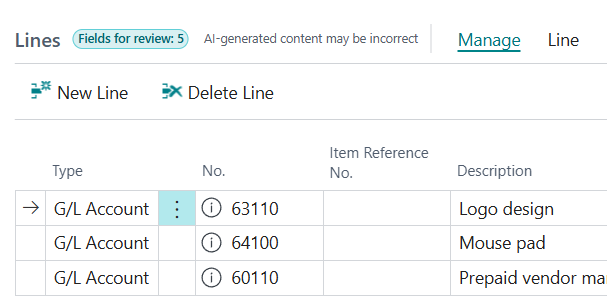
- Inline review on pages: agent-generated content appears directly on the page where you work, ready to check and adjust before it is applied.
- Avatars in lists: you can see at a glance whether a record was created or changed by a colleague or by an agent.
- Simpler permissions: agents run with their own, limited permissions, and you can grant more only when an agent asks for them.
- Existing controls still apply: approval workflows, posting rules and audit trails work for agent-created documents exactly as they do for documents created by people.
Beyond the Built-in Agents: MCP
Business Central also includes a Model Context Protocol (MCP) server, which lets external AI tools such as Copilot Studio agents or other AI assistants work with your Business Central data securely. In version 29, MCP clients can also define and run custom data queries, even where no standard API exists. This opens the door to custom agents built for your company’s own processes. Read more in our article on the Business Central MCP server.
A Practical Roadmap
- Pick one process with high volume and clear rules, such as vendor invoices or employee expenses.
- Get the master data right. Vendors, items, expense categories and posting groups are what agents rely on.
- Name a supervisor for each agent who reviews its tasks every day.
- Measure the results, such as time saved, error rates and processing times, and keep an eye on Copilot Credit consumption.
- Expand step by step once the first agent is running reliably.
Frequently Asked Questions
What AI agents are available in Business Central?
The main built-in agents are the Sales Order Agent (customer requests to quotes and orders), the Payables Agent (vendor invoices to purchase invoice drafts) and the Expense Agent (receipts to expense reports, in preview). Custom agents can also connect through the MCP server.
Do Business Central agents post transactions without human approval?
Agents prepare drafts and tasks that people review. You decide which steps need human review, and your existing approval workflows and posting controls still apply.
How are Business Central agents billed?
Agents are billed by consumption through Copilot Credits, based on the work they perform. Standard Copilot features remain included in the Business Central licence.
AI agents won’t replace your finance or sales team, but they can take over a large part of the routine work so your people can focus on decisions, customers and exceptions.
Not sure which agent to start with? Contact us for a free consultation.
Related reading